

See the code
See the full example code
Set up a Managed Budget
First you’ll need to either initialize a new budget, or use an existing one, and allow the budget to spend a certain amount of your selected ERC20.Define The Action
Next you’ll need to define the action that qualifies a user to claim the reward. For Zora, we want to reward users that mint a specific NFT on Zora. To do this, we’ll key off of thePurchased event,
which has the event signature Purchased(address indexed,address indexed,uint256 indexed,uint256,uint256).
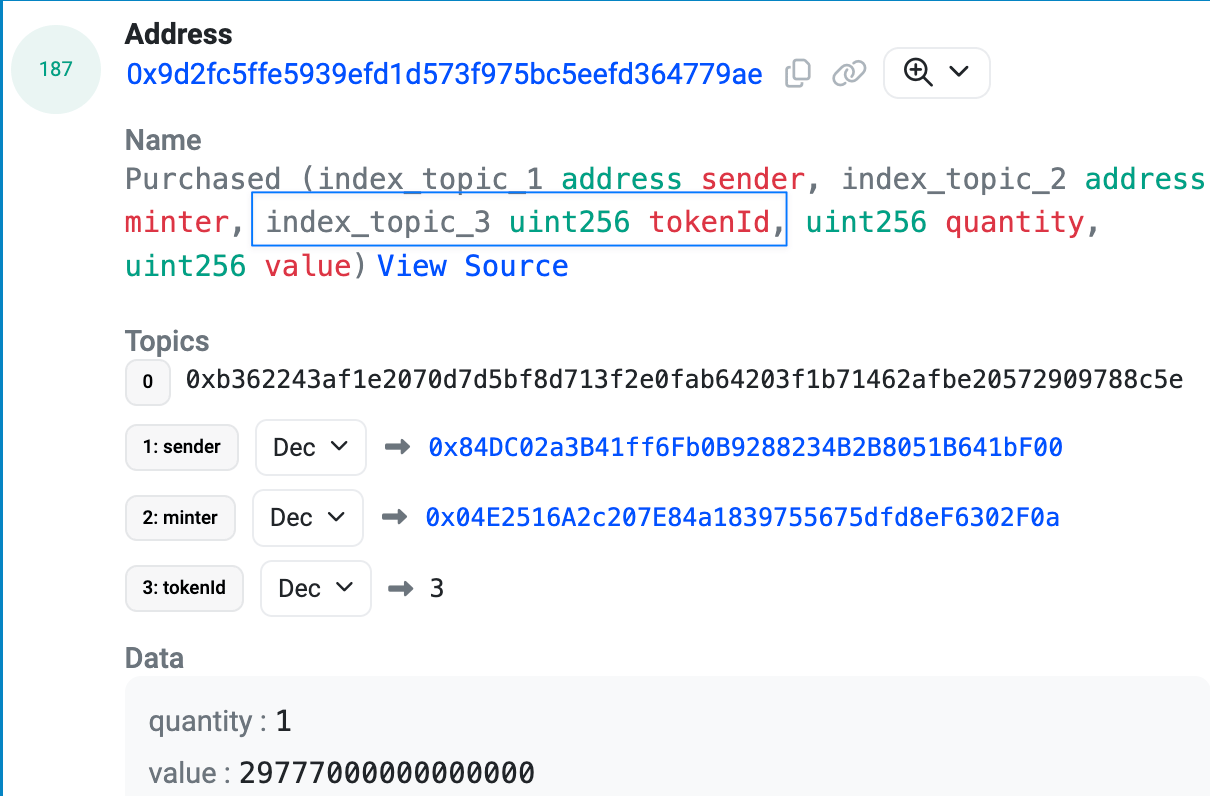
'Purchased' Event Structure. We reference the event arguments using zero-based indexing. The third argument represents the tokenId, which corresponds to index 2.
Purchased event.
The important parameters to target in the event data are the tokenId and the NFT contract address.
Here is an example of the Purchased event
eventAction payload consists of the actionClaimant and the actionSteps we defined previously.
The purpose of the eventAction is to track and reward users based on their interactions with the specified event.
-
actionClaimant: This object defines the conditions under which a user is eligible to claim rewards. It includes:
signatureType: Specifies that the signature type is an event.signature: The event signature we are targeting, in this case, thePurchasedevent.fieldIndex: Indicates which field in the event data we are interested in; We can target any field that contains the claimants address.targetContract: The address of the contract we are monitoring for the event.
-
actionSteps: This array can contain up to four action steps that outline the specific actions or conditions that must be met for the event action to be valid. In this example, we include the previously defined
eventActionStep.
EventAction, passing in the constructed eventActionPayload.
Deploy the Boost
Once the event action is created, we can set up the incentives and deploy our boost.Claiming Incentives
Once a claimant has successfully completed the action, you can claim the incentive for that claimant. In order to successfully claim the reward for a claimant, you will need to generate the signature payload. To generate the signature payload you will need to call the Boost/signatures api endpoint with the following params:
boostId: The id of the boost where the action was completed. The format ischainId:boostId(e.g.8453:0x378632819f39c74c4f56b1429e760739c5fb51b7:12)txHash: The hash of the transaction that completed the action.
Claim Signature API
See additional documentation on how to build a claim signature
maxParticipants set for the boost is reached.