

The Home Dashboard
When a user lands on rabbithole.gg, the home dashboard surfaces everything they need to know about what they’re earning and what’s available to earn next.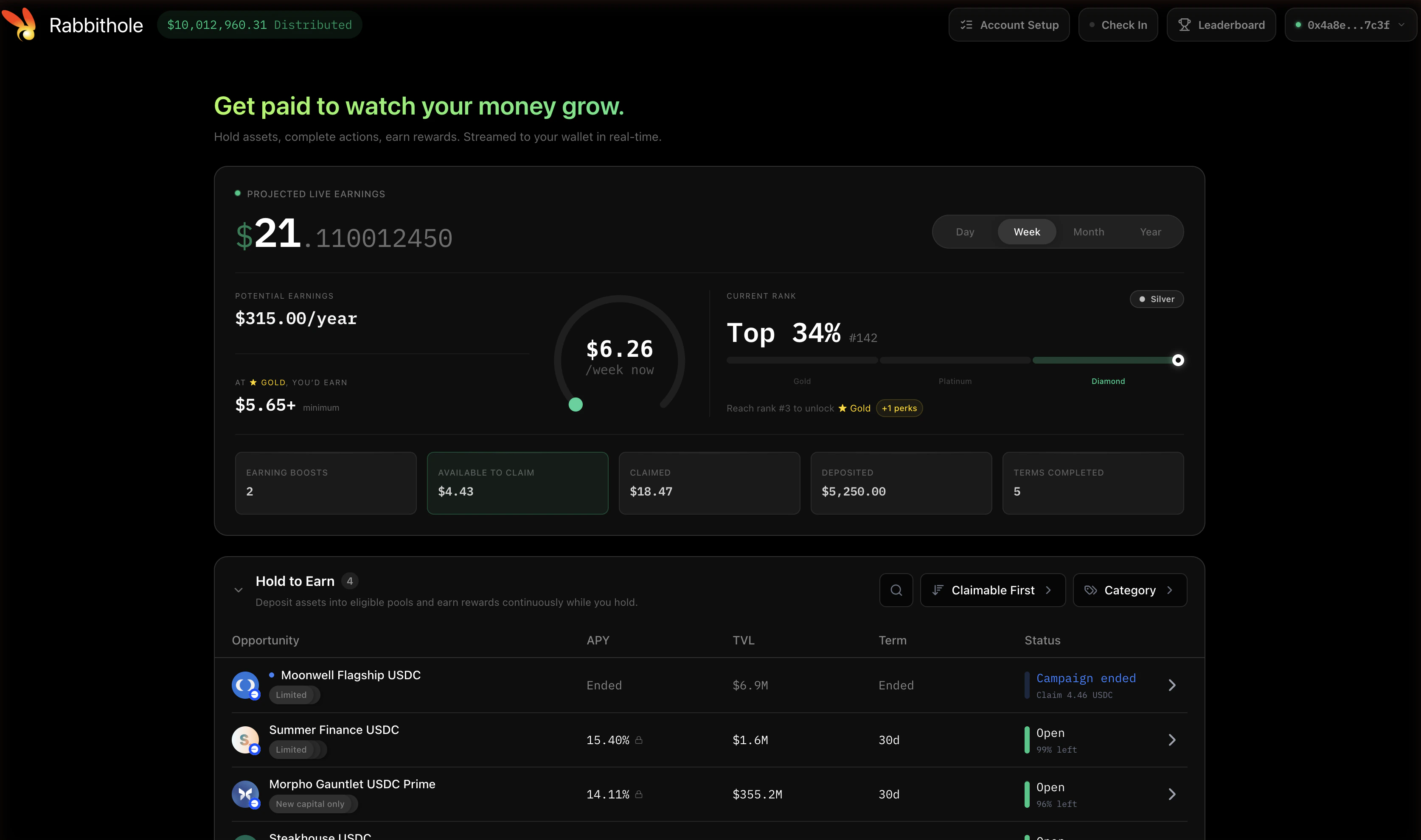
- Projected Live Earnings — a real-time counter ticking up every second as rewards accrue. The Day / Week / Month / Year toggle changes the projection horizon.
- Potential Earnings — what the user is on track to earn over the selected window if they keep their current positions.
- Current Rank — the user’s leaderboard position and tier (Bronze, Silver, Gold, Platinum, Diamond).
- Dashboard stats — at-a-glance numbers for active boosts, claimable rewards, lifetime claimed, total deposited, and one-time terms completed.
- Hold to Earn — the active TBI campaigns the user qualifies for, with APY, TVL, term length, and current status.
- One-Time Actions — discrete tasks (swaps, mints, votes) that pay a fixed reward, separate from continuous Hold to Earn rewards.
Joining a Campaign
Clicking into a Hold to Earn opportunity opens the campaign’s detail panel.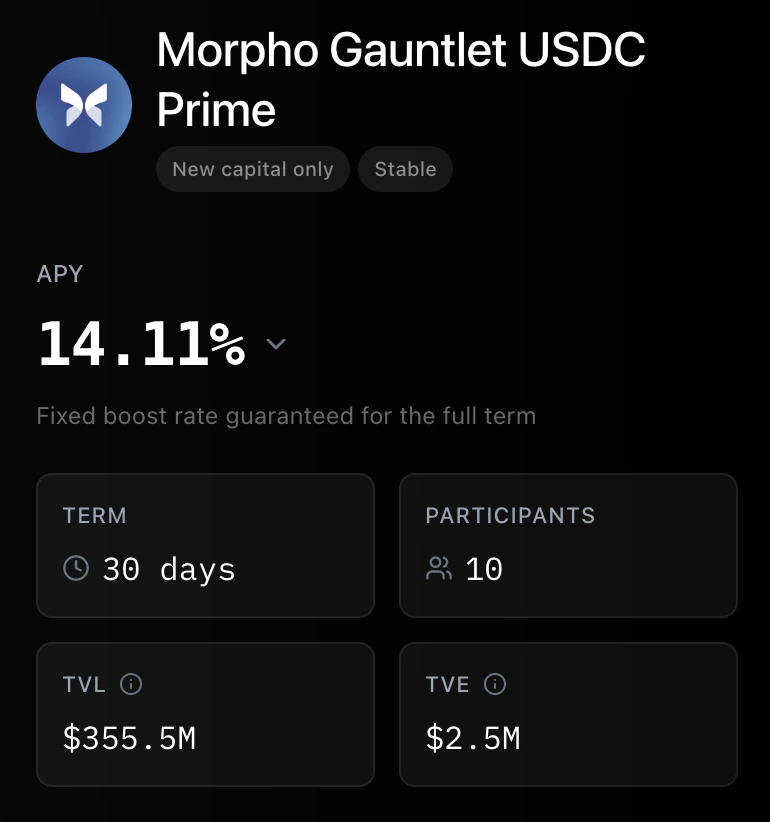
- APY — the current rate, with a sub-line indicating whether it’s fixed for the term or floats with TVL.
- Term, Participants, TVL, TVE — the four-card summary of campaign size, schedule, and engagement.
- Remaining Rewards — how much of the budget is still flowing.
- Description — what the user has to hold to earn.
- Deposit Tiers (when configured) — multiplier breakpoints that reward larger positions super-proportionally. See Campaign Modes.
- Activation callout (when applicable) — a reminder that only deposits routed through Rabbithole earn rewards on this campaign. See Earning Activation.
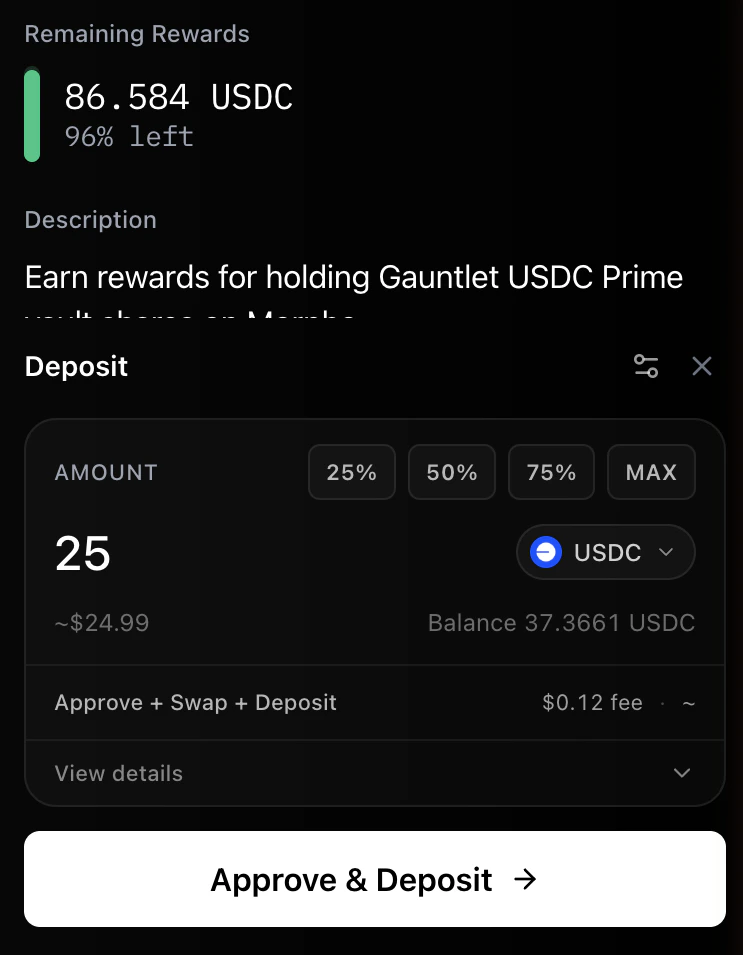
- Amount — the position the user wants to open, with 25/50/75/MAX percentage shortcuts.
- Token selector — pick the token to deposit; the form swaps under the hood if the campaign target uses a different asset.
- Swap + Deposit fee — a preview of the network fee for the transaction.
- Deposit — confirms the transaction. The deposit routes through Boost (activating the user for any campaigns with Earning Activation enabled) and lands in the underlying protocol.
Watching Rewards Accrue
After depositing, the home dashboard’s “Projected Live Earnings” counter starts ticking up in real time. The “Potential Earnings” estimate adjusts as the campaign’s APY shifts. There’s nothing the user has to do to keep earning — the position just has to stay open. If the user partially withdraws, their earning rate drops proportionally. If they fully exit, accrual stops, but every reward they had already earned stays in their accrued balance and remains claimable.Claiming Rewards
Rewards become claimable shortly after a campaign goes live and at every snapshot afterward. When a campaign has rewards ready, the user can claim them directly from the campaign detail panel.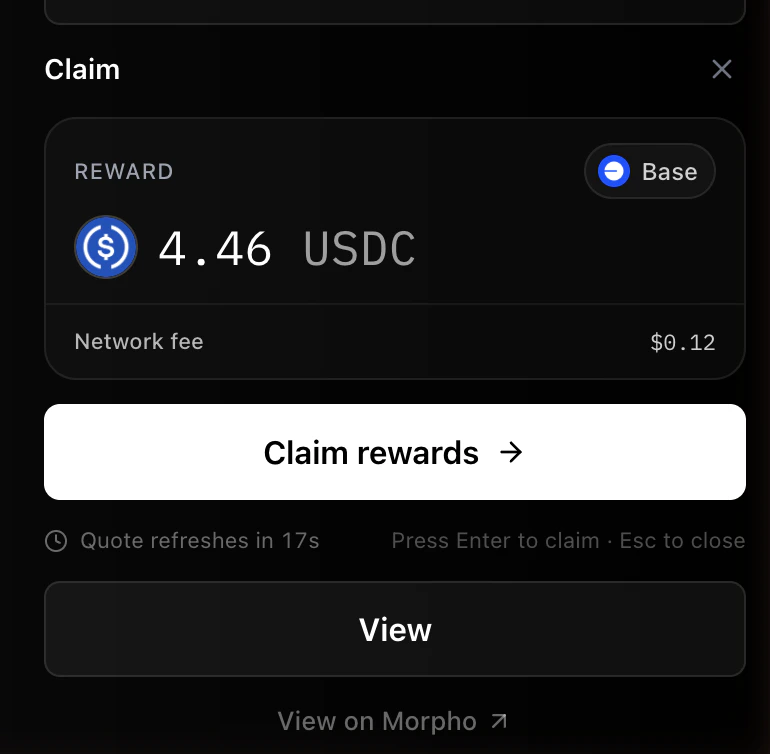
- Reward amount — the cumulative total available right now, denominated in the campaign’s reward token.
- Network fee — gas estimate for the claim transaction, refreshed periodically.
- Claim rewards — a single button that submits the on-chain claim and transfers the rewards to the user’s wallet.
Tier and Leaderboard
Beyond per-campaign rewards, rabbithole.gg tracks user activity into a tier system: Bronze → Silver → Gold → Platinum → Diamond. Tiers reflect cumulative engagement across all the campaigns and actions a user has participated in. Tier perks vary depending on what’s running — priority on capacity-limited campaigns, allowlist access to gated launches, and fee or boost benefits at higher tiers.Where Funds Sit
- Principal stays in the protocol. A vault deposit goes into the vault; an Aave supply goes into Aave. Boost doesn’t custody user funds — receipt tokens live in the user’s own wallet from the moment of deposit.
- Reward funds live in the campaign contract. Each campaign has its own contract holding its reward budget. Rewards transfer to the user when they claim.
Keep Exploring
How It Works
The full picture of a campaign — how protocols configure it, how Boost runs it, and how rewards flow.
Reward Calculation
How eligible balance and time held translate into actual reward amounts.
Earning Activation
How some campaigns gate rewards to users who entered through Boost.
Glossary
Quick definitions for terms used across the docs.