> ## Documentation Index
> Fetch the complete documentation index at: https://docs.boost.xyz/llms.txt
> Use this file to discover all available pages before exploring further.
# Setting up an Action
> Configure the on-chain action you want to incentivize with your boost
These docs are under active development and will be subject to changes.
Actions define what onchain behavior you want to reward. With One-Time Actions, you can incentivize virtually any blockchain activity, from NFT mints to token swaps to governance votes.
## What is an Action?
An action tells Boost what to look for on the blockchain. When someone performs the activity you've defined, they become eligible for rewards.
Every action has three parts:
Which smart contract and which specific activity (like a mint or transfer) to monitor.
How to identify the person who performed the action so they can claim their reward.
Any specific conditions that must be met (like a minimum amount or specific token).
One-Time Actions can target custom onchain activity across supported contracts and chains.
## Creating an Action from a Transaction
The easiest way to set up an action is to show Boost an example transaction. Just paste a transaction hash, and Boost will automatically figure out the details.
### Step-by-Step Guide
Go to a block explorer like [Basescan](https://basescan.org) or [Etherscan](https://etherscan.io) and find a transaction that represents what you want to incentivize.
**Good examples:**
* Someone minting an NFT you want to promote
* A swap on your DEX
* A vote or delegation in your governance system
Copy the transaction hash (the long string starting with `0x...`).
Enter the transaction hash in the Boost action creator. The system will automatically:
* Pull up the transaction details
* Identify all the activities that happened
* Show you which ones can be used for rewards
You'll see a list of events from the transaction. Pick the one that best represents what you want to incentivize.
For example, if you want to reward NFT mints, you'd typically select a `Transfer` or `Mint` event.
Don't worry if you're not sure which to pick—the AI assistant can help you choose the right one.
## Let AI Help You Configure
Boost includes an AI assistant (powered by Claude) that can help you set up your action. Just describe what you want to reward in plain English, and the AI will suggest the best configuration.
### How It Works
Write a simple description of the behavior you want to incentivize:
* *"Reward anyone who mints an NFT from this collection"*
* *"Give rewards to users who swap at least \$100 worth of tokens"*
* *"Incentivize people who vote on governance proposals"*
Based on your description and the transaction you provided, the AI will:
* Pick the right event to track
* Figure out how to identify who performed the action
* Set up any filters you need
* Recommend whether to use fixed or variable rewards
* Explain its reasoning so you can verify it makes sense
Look over the AI's suggestions. You can accept them as-is or make changes if needed.
The AI will also warn you if something doesn't look right—for example, if your description asks for something the transaction doesn't support.
### Fixed vs Variable Rewards
The AI will recommend a reward type based on your description:
Everyone who qualifies gets the same reward amount.
**The AI suggests fixed rewards when you say things like:**
* *"Give 100 tokens for each mint"*
* *"Reward exactly 50 USDC per vote"*
* *"Pay 10 tokens to anyone who completes this action"*
**Best for:** Simple campaigns where all participants should be treated equally.
Rewards scale based on what the user did (like how much they swapped or how many NFTs they minted).
**The AI suggests variable rewards when you say things like:**
* *"Reward users who swap at least 100 USDC"*
* *"Give more rewards for larger purchases"*
* *"Scale rewards based on the number of NFTs minted"*
**Best for:** Campaigns where you want to incentivize bigger actions.
## Providing Project Information
When creating an action, you'll need to provide some information about your project:
Enter the URL where users can perform the action you're incentivizing. This helps the Boost team verify your action and helps users find where to participate.
**Examples:**
* `https://yourproject.xyz/mint`
* `https://app.yourdex.com/swap`
* `https://governance.yourprotocol.io`
The project URL is required. Make sure it's the actual page where users will perform the action.
Add any additional context that helps explain what your project does and why you're running this campaign.
## Preview Your Action
Before submitting, you can preview recent transactions that match your configuration:
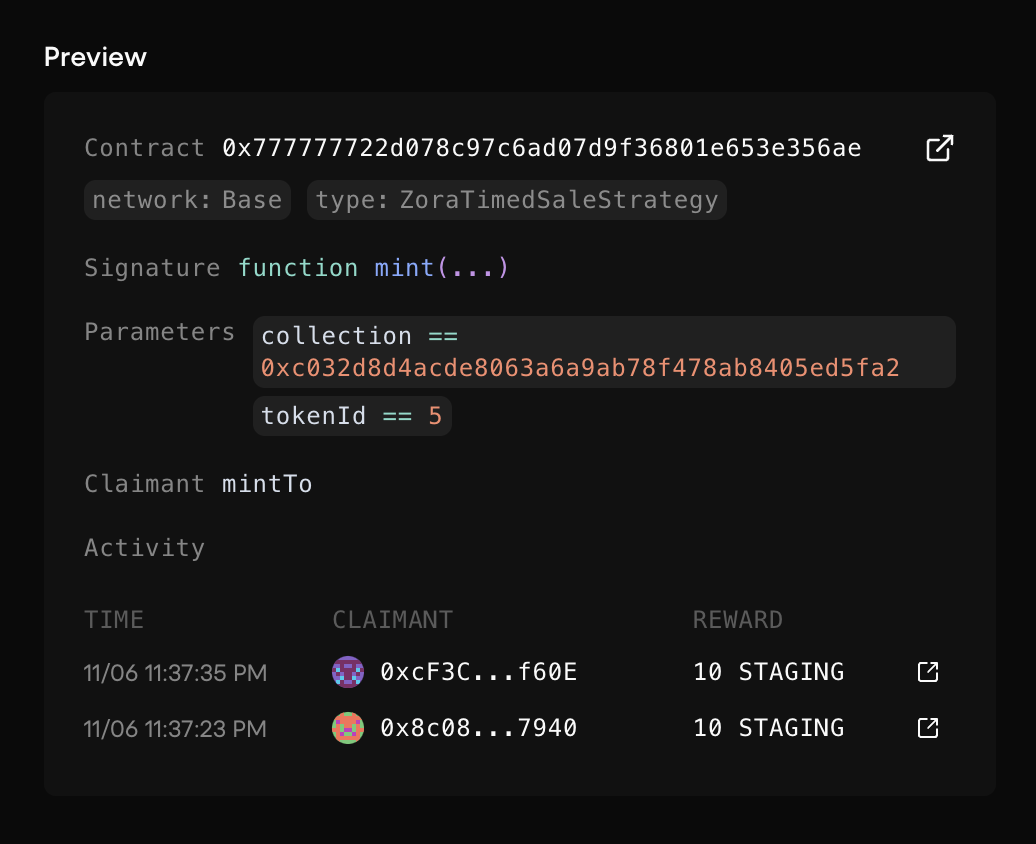 This preview helps you verify that:
* The right transactions are being captured
* The correct people would receive rewards
* Your filters are working as expected
If the preview shows unexpected results, go back and adjust your configuration. It's much easier to fix issues now than after your action is live.
## Review and Approval Process
All new actions must be reviewed and approved by the Boost team before you can use them. This typically takes 24-48 hours.
### Why Review is Required
The review process ensures that:
* Your action is set up correctly and will work as intended
* The configuration captures the right transactions
* There are no security issues or ways to game the system
* Your project information is accurate
### What the Team Reviews
When you submit an action, the Boost team will:
| Review Item | What They Check |
| ------------------------- | -------------------------------------------------------------------------------- |
| **Test the action** | Run your configuration against real transactions to make sure it works correctly |
| **Verify the setup** | Confirm the right events, parameters, and filters are configured |
| **Check security** | Look for potential abuse vectors or gaming opportunities |
| **Validate project info** | Verify the project URL and details you provided are accurate |
### Action Status
After submitting, your action will have one of these statuses:
| Status | What It Means |
| ------------ | -------------------------------------------------------- |
| **Pending** | Waiting for the Boost team to review |
| **Approved** | Ready to use! You can now deploy boosts with this action |
| **Rejected** | Something needs to be fixed—check the feedback provided |
### If Your Action is Rejected
Don't worry—rejections usually just mean something needs a small fix. You'll receive feedback explaining:
* What the issue was
* How to fix it
You can then create a new action with the corrections. If you're unsure about the feedback, reach out on [Discord](https://discord.gg/gdu3EpeqsD) for help.
## Tips for Success
When choosing your example transaction, pick one that represents normal user behavior. Unusual or edge-case transactions might lead to configurations that don't work well for most users.
The more specific you are, the better the AI can help:
* ❌ *"Reward mints"*
* ✅ *"Reward users who mint at least 2 NFTs from the CoolCats collection"*
Always check the activity preview before submitting. It shows you exactly what transactions would qualify, so you can catch any issues early.
Make sure the URL you provide is correct and leads to where users can actually perform the action. This speeds up the review process.
## Next Steps
Once your action is approved, you're ready to configure your rewards and launch your campaign.
Learn how to set up rewards and deploy your boost campaign.
This preview helps you verify that:
* The right transactions are being captured
* The correct people would receive rewards
* Your filters are working as expected
If the preview shows unexpected results, go back and adjust your configuration. It's much easier to fix issues now than after your action is live.
## Review and Approval Process
All new actions must be reviewed and approved by the Boost team before you can use them. This typically takes 24-48 hours.
### Why Review is Required
The review process ensures that:
* Your action is set up correctly and will work as intended
* The configuration captures the right transactions
* There are no security issues or ways to game the system
* Your project information is accurate
### What the Team Reviews
When you submit an action, the Boost team will:
| Review Item | What They Check |
| ------------------------- | -------------------------------------------------------------------------------- |
| **Test the action** | Run your configuration against real transactions to make sure it works correctly |
| **Verify the setup** | Confirm the right events, parameters, and filters are configured |
| **Check security** | Look for potential abuse vectors or gaming opportunities |
| **Validate project info** | Verify the project URL and details you provided are accurate |
### Action Status
After submitting, your action will have one of these statuses:
| Status | What It Means |
| ------------ | -------------------------------------------------------- |
| **Pending** | Waiting for the Boost team to review |
| **Approved** | Ready to use! You can now deploy boosts with this action |
| **Rejected** | Something needs to be fixed—check the feedback provided |
### If Your Action is Rejected
Don't worry—rejections usually just mean something needs a small fix. You'll receive feedback explaining:
* What the issue was
* How to fix it
You can then create a new action with the corrections. If you're unsure about the feedback, reach out on [Discord](https://discord.gg/gdu3EpeqsD) for help.
## Tips for Success
When choosing your example transaction, pick one that represents normal user behavior. Unusual or edge-case transactions might lead to configurations that don't work well for most users.
The more specific you are, the better the AI can help:
* ❌ *"Reward mints"*
* ✅ *"Reward users who mint at least 2 NFTs from the CoolCats collection"*
Always check the activity preview before submitting. It shows you exactly what transactions would qualify, so you can catch any issues early.
Make sure the URL you provide is correct and leads to where users can actually perform the action. This speeds up the review process.
## Next Steps
Once your action is approved, you're ready to configure your rewards and launch your campaign.
Learn how to set up rewards and deploy your boost campaign.