> ## Documentation Index
> Fetch the complete documentation index at: https://docs.boost.xyz/llms.txt
> Use this file to discover all available pages before exploring further.
# Boost an NFT Mint on Zora
> Learn how to reward users with ERC20 rewards when they mint an NFT on Zora.
In this example, you've created an NFT on Zora, and want to incentivize users to mint it by offering additional rewards.
Make sure you've completed the [quick start](/v2/boost-sdk/quick-start) guide before proceeding with this example.
See the full example code
## Set up a Managed Budget
First you'll need to either initialize a new budget, or use an existing one, and allow the budget to spend a certain amount of your selected ERC20.
```ts index.ts theme={null}
import { BoostCore } from '@boostxyz/sdk/BoostCore'
import { BoostRegistry } from '@boostxyz/sdk/BoostRegistry'
import { ManagedBudget, Roles } from '@boostxyz/sdk'
import { parseUnits, erc20Abi } from 'viem'
import { wagmiConfig } from '../config'
// Initialize the BoostCore and BoostRegistry modules
const registry = new BoostRegistry({ config: wagmiConfig })
const core = new BoostCore({ config: wagmiConfig })
// Get the address of the BoostCore module
const coreAddress = core.assertValidAddress()
// Create a new budget and grant the correct permissions to the protocol
const budget = await registry.initialize('MyBudget', core.ManagedBudget({
owner: "0xME",
authorized: ["0xME", coreAddress], // authorized addresses
roles: [Roles.ADMIN, Roles.MANAGER] // roles that the budget can assign to the protocol
}))
// scaffold your desired incentive to help calculate the total amount required to fund your budget
const erc20Incentive = core.ERC20Incentive({
asset: '0xC02aaA39b223FE8D0A0e5C4F27eAD9083C756Cc2',
reward: parseEther('1'),
limit: 10n,
strategy: StrategyType.POOL,
})
const budgetedAmount = await erc20Incentive.getTotalBudget() // 10 WETH
const amountIncludingFees = await core.calculateProtocolFee(budgetedAmount)
// Allow the budget to spend your ERC20 token.
await writeContract(wagmiConfig, {
abi: erc20Abi,
address: '0xC02aaA39b223FE8D0A0e5C4F27eAD9083C756Cc2', // The address of the ERC20 token you want to approve
functionName: 'approve',
args: [
budget.assertValidAddress(), // The address of the budget account
budgetedAmount // The amount of ERC20 token you want to approve, including protocol fee
],
})
// Allocate assets to the budget
await budget.allocate({
amount: budgetedAmount
asset: '0xC02aaA39b223FE8D0A0e5C4F27eAD9083C756Cc2',
target: "0xME",
})
```
```ts config.ts theme={null}
import { http, createConfig } from '@wagmi/core'
import { mainnet, sepolia } from '@wagmi/core/chains'
export const config = createConfig({
chains: [mainnet, sepolia],
transports: {
[mainnet.id]: http(),
[sepolia.id]: http(),
},
})
```
## Define The Action
Next you'll need to define the action that qualifies a user to claim the reward.
For Zora, we want to reward users that mint a specific NFT on Zora. To do this, we'll key off of the `Purchased` event,
which has the event signature `Purchased(address indexed,address indexed,uint256 indexed,uint256,uint256)`.
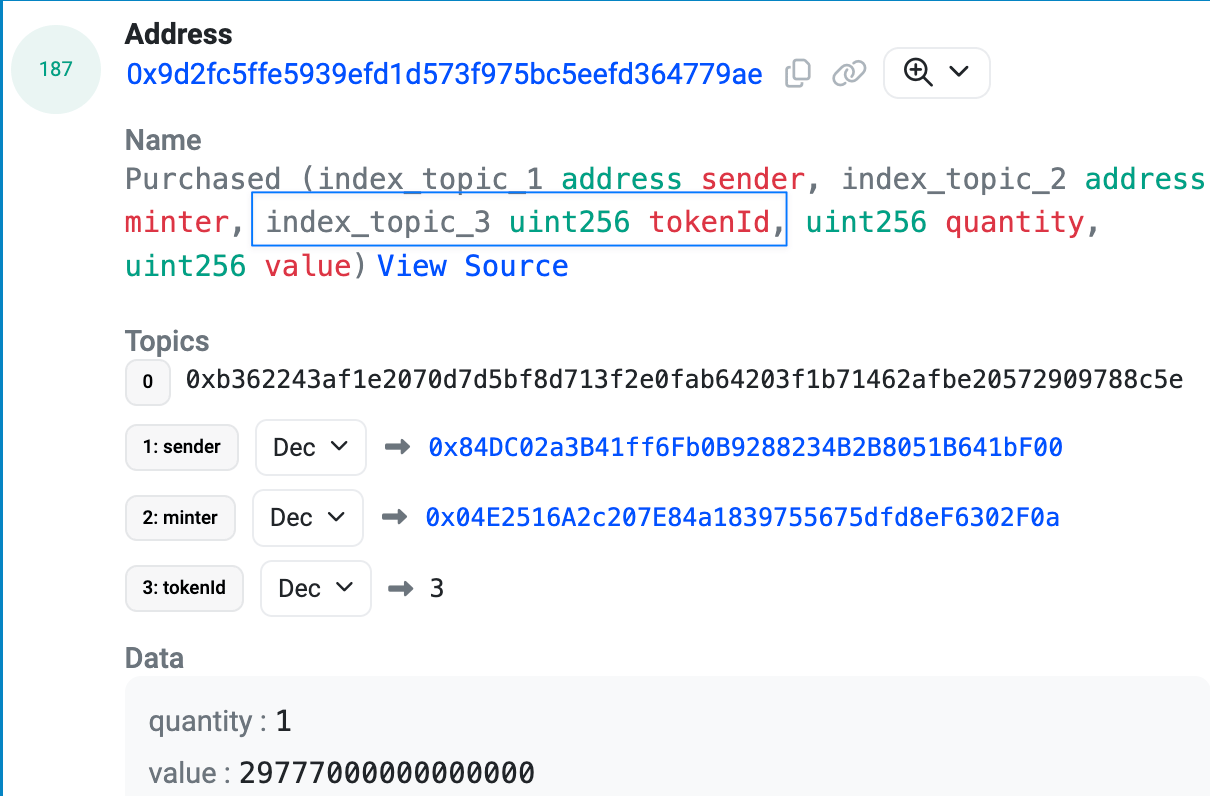 Here is how you can structure the EventActionPayload to target the `Purchased` event.
The important parameters to target in the event data are the tokenId and the NFT contract address.
If you're using a known event, you can use the selectors package to get the signature.
```ts theme={null}
import { selectors } from '@boostxyz/signatures/events'
const selector = selectors[
'Purchased(address indexed,address indexed,uint256 indexed,uint256,uint256)'
] as Hex;
```
[Here is an example of the Purchased event](https://basescan.org/tx/0x17a4d7e08acec16f385d2a038b948359919e3675eca22a09789b462a9178a769#eventlog#187)
```ts theme={null}
import {
EventActionPayload,
ActionStep,
ActionClaimant,
SignatureType,
FilterType,
PrimitiveType
} from '@boostxyz/sdk/Actions/EventAction'
import { selectors } from '@boostxyz/signatures/events'
// Use the Purchased signature from the selectors package
const selectedSignature = selectors[
'Purchased(address indexed,address indexed,uint256 indexed,uint256,uint256)'
] as Hex;
// The EventAction step outlines the criteria that the validator uses to determine eligibility for reward redemption.
const eventActionStep: ActionStep = {
signature: selectedSignature,
signatureType: SignatureType.EVENT,
targetContract: '0x9D2FC5fFE5939Efd1d573f975BC5EEFd364779ae', // The address of the Zora NFT contract
// We want to target the `tokenId` property on the Purchase event
actionParameter: {
filterType: FilterType.EQUAL, // Filter to check for equality
fieldType: PrimitiveType.UINT, // The field we're filtering is the tokenId
fieldIndex: 2, // The index of the tokenId in the event data
filterData: toHex(3n, { size: 1 }), // Targetting tokenId 3 on the collection (filter data must be in hex)
},
};
```
Next, we need to define the action claimant and create the payload for the new event action.
The `eventAction` payload consists of the `actionClaimant` and the `actionSteps` we defined previously.
The purpose of the `eventAction` is to track and reward users based on their interactions with the specified event.
1. **actionClaimant**: This object defines the conditions under which a user is eligible to claim rewards. It includes:
* `signatureType`: Specifies that the signature type is an event.
* `signature`: The event signature we are targeting, in this case, the `Purchased` event.
* `fieldIndex`: Indicates which field in the event data we are interested in; We can target any field that contains the claimants address.
* `targetContract`: The address of the contract we are monitoring for the event.
2. **actionSteps**: This array can contain up to four action steps that outline the specific actions or conditions that must be met for the event action to be valid. In this example, we include the previously defined `eventActionStep`.
Next, we create an `EventAction`, passing in the constructed `eventActionPayload`.
```ts theme={null}
const eventActionPayload = {
actionClaimant: {
signatureType: SignatureType.EVENT,
signature: selectedSignature, // Purchased event signature
fieldIndex: 0, // Targeting the 'sender' argument which is the address that initiated the purchase
targetContract: '0x9D2FC5fFE5939Efd1d573f975BC5EEFd364779ae', // The address of the Zora NFT contract
},
actionSteps: [eventActionStep] // use can place up to 4 action steps
};
// create the EventAction with the custom payload
const eventAction = core.EventAction(eventActionPayload);
```
## Deploy the Boost
Once the event action is created, we can set up the incentives and deploy our boost.
```ts theme={null}
import { StrategyType } from '@boostxyz/sdk/Incentive'
// This allows for 10 participants to be rewarded with 1 token each
const incentives = [
core.ERC20Incentive({
asset: '0xC02aaA39b223FE8D0A0e5C4F27eAD9083C756Cc2',
reward: parseEther('1'),
limit: 10n,
strategy: StrategyType.POOL,
}),
],
```
```ts theme={null}
// Deploy the boost
const boost = await core.createBoost({
maxParticipants: 10n, // Set a max number of participants
budget: budget, // Use the ManagedBudget we set up earlier
action: eventAction, // Pass the manually created EventAction
incentives: incentives,
allowList: core.OpenAllowList(),
});
```
## Claiming Incentives
Once a claimant has successfully completed the action, you can claim the incentive for that claimant.
`ERC20Incentive` is a fixed reward incentive. If you would like to have a variable reward based on on-chain logic, you can use the `ERC20VariableCriteriaIncentive` type.
In order to successfully claim the reward for a claimant, you will need to generate the signature payload.
To generate the signature payload you will need to call the Boost `/signatures` api endpoint with the following params:
* `boostId`: The id of the boost where the action was completed. The format is `chainId:boostId` (e.g. `8453:0x378632819f39c74c4f56b1429e760739c5fb51b7:12`)
* `txHash`: The hash of the transaction that completed the action.
The signatures api will return an array of signatures, one for each available incentive on the boost.
See additional documentation on how to build a claim signature
```ts theme={null}
import axios from 'axios';
const { data } = await axios.get(`${BOOST_API_URL}/signatures`, {
params: {
boostId: `${chainId}:${boostCoreAddress}:${boost.id}`,
txHash,
}
});
for (const item of data) {
const { signature, incentiveId, claimant } = item;
// Claim the incentive for the claimant
await core.claimIncentiveFor(
boost.id,
incentiveId,
referrer,
signature,
claimant,
);
}
```
There can be multiple incentives to claim in a single boost. The example shown only has one incentive.
The boost will stay active until the `maxParticipants` set for the boost is reached.
Here is how you can structure the EventActionPayload to target the `Purchased` event.
The important parameters to target in the event data are the tokenId and the NFT contract address.
If you're using a known event, you can use the selectors package to get the signature.
```ts theme={null}
import { selectors } from '@boostxyz/signatures/events'
const selector = selectors[
'Purchased(address indexed,address indexed,uint256 indexed,uint256,uint256)'
] as Hex;
```
[Here is an example of the Purchased event](https://basescan.org/tx/0x17a4d7e08acec16f385d2a038b948359919e3675eca22a09789b462a9178a769#eventlog#187)
```ts theme={null}
import {
EventActionPayload,
ActionStep,
ActionClaimant,
SignatureType,
FilterType,
PrimitiveType
} from '@boostxyz/sdk/Actions/EventAction'
import { selectors } from '@boostxyz/signatures/events'
// Use the Purchased signature from the selectors package
const selectedSignature = selectors[
'Purchased(address indexed,address indexed,uint256 indexed,uint256,uint256)'
] as Hex;
// The EventAction step outlines the criteria that the validator uses to determine eligibility for reward redemption.
const eventActionStep: ActionStep = {
signature: selectedSignature,
signatureType: SignatureType.EVENT,
targetContract: '0x9D2FC5fFE5939Efd1d573f975BC5EEFd364779ae', // The address of the Zora NFT contract
// We want to target the `tokenId` property on the Purchase event
actionParameter: {
filterType: FilterType.EQUAL, // Filter to check for equality
fieldType: PrimitiveType.UINT, // The field we're filtering is the tokenId
fieldIndex: 2, // The index of the tokenId in the event data
filterData: toHex(3n, { size: 1 }), // Targetting tokenId 3 on the collection (filter data must be in hex)
},
};
```
Next, we need to define the action claimant and create the payload for the new event action.
The `eventAction` payload consists of the `actionClaimant` and the `actionSteps` we defined previously.
The purpose of the `eventAction` is to track and reward users based on their interactions with the specified event.
1. **actionClaimant**: This object defines the conditions under which a user is eligible to claim rewards. It includes:
* `signatureType`: Specifies that the signature type is an event.
* `signature`: The event signature we are targeting, in this case, the `Purchased` event.
* `fieldIndex`: Indicates which field in the event data we are interested in; We can target any field that contains the claimants address.
* `targetContract`: The address of the contract we are monitoring for the event.
2. **actionSteps**: This array can contain up to four action steps that outline the specific actions or conditions that must be met for the event action to be valid. In this example, we include the previously defined `eventActionStep`.
Next, we create an `EventAction`, passing in the constructed `eventActionPayload`.
```ts theme={null}
const eventActionPayload = {
actionClaimant: {
signatureType: SignatureType.EVENT,
signature: selectedSignature, // Purchased event signature
fieldIndex: 0, // Targeting the 'sender' argument which is the address that initiated the purchase
targetContract: '0x9D2FC5fFE5939Efd1d573f975BC5EEFd364779ae', // The address of the Zora NFT contract
},
actionSteps: [eventActionStep] // use can place up to 4 action steps
};
// create the EventAction with the custom payload
const eventAction = core.EventAction(eventActionPayload);
```
## Deploy the Boost
Once the event action is created, we can set up the incentives and deploy our boost.
```ts theme={null}
import { StrategyType } from '@boostxyz/sdk/Incentive'
// This allows for 10 participants to be rewarded with 1 token each
const incentives = [
core.ERC20Incentive({
asset: '0xC02aaA39b223FE8D0A0e5C4F27eAD9083C756Cc2',
reward: parseEther('1'),
limit: 10n,
strategy: StrategyType.POOL,
}),
],
```
```ts theme={null}
// Deploy the boost
const boost = await core.createBoost({
maxParticipants: 10n, // Set a max number of participants
budget: budget, // Use the ManagedBudget we set up earlier
action: eventAction, // Pass the manually created EventAction
incentives: incentives,
allowList: core.OpenAllowList(),
});
```
## Claiming Incentives
Once a claimant has successfully completed the action, you can claim the incentive for that claimant.
`ERC20Incentive` is a fixed reward incentive. If you would like to have a variable reward based on on-chain logic, you can use the `ERC20VariableCriteriaIncentive` type.
In order to successfully claim the reward for a claimant, you will need to generate the signature payload.
To generate the signature payload you will need to call the Boost `/signatures` api endpoint with the following params:
* `boostId`: The id of the boost where the action was completed. The format is `chainId:boostId` (e.g. `8453:0x378632819f39c74c4f56b1429e760739c5fb51b7:12`)
* `txHash`: The hash of the transaction that completed the action.
The signatures api will return an array of signatures, one for each available incentive on the boost.
See additional documentation on how to build a claim signature
```ts theme={null}
import axios from 'axios';
const { data } = await axios.get(`${BOOST_API_URL}/signatures`, {
params: {
boostId: `${chainId}:${boostCoreAddress}:${boost.id}`,
txHash,
}
});
for (const item of data) {
const { signature, incentiveId, claimant } = item;
// Claim the incentive for the claimant
await core.claimIncentiveFor(
boost.id,
incentiveId,
referrer,
signature,
claimant,
);
}
```
There can be multiple incentives to claim in a single boost. The example shown only has one incentive.
The boost will stay active until the `maxParticipants` set for the boost is reached.